Run a FreeToken model
Before you start
FreeToken has a narrower hardware/model policy than the other engines. Read the generated compatibility matrix. The current adapter uses whole homogeneous NVIDIA GPUs on one node, not MIG or time-slicing slots. Unsupported devices are disabled with their reason.
Use a model artifact admitted by the catalog and a promoted FreeToken runtime. Do not assume that every repository returned by Hugging Face is a valid FreeToken model.
Create with automatic settings
- Open Models → Create, choose FreeToken, then an eligible node/GPU allocation.
- Search and select a supported checkpoint. Confirm its exact repository and artifact.
- Choose the number of physical GPUs when the model supports tensor parallelism.
- Keep Memory strategy → Auto for the initial test.
- Review GPU memory and System RAM. Do not reserve all host memory; leave room for the platform and other workloads. Unknown live capacity must be fixed before a meaningful budget can be selected.
- Keep Advanced Settings closed unless adjusting context, concurrency, cache or a documented runtime setting for a specific reason.
- Create the model and use Logs to follow initialization. Verify with a small request through the common API endpoint.
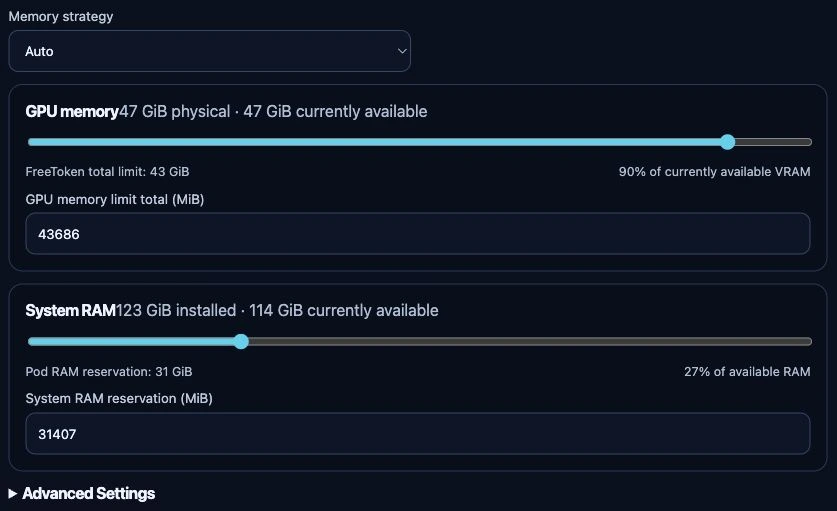
Unsubmitted test-appliance form, 24 September 2026. No model was selected or created for this capture. The displayed capacities and initial budgets belong to this test device; they are not recommended settings or evidence that a particular checkpoint fits. Review both budgets after choosing your model.
What the memory controls mean
- GPU memory is the total planned budget across the selected GPUs. At runtime it is checked against the free memory on each assigned device; it is not an isolated hardware-enforced VRAM partition.
- System RAM is the Pod's resource policy, not a FreeToken CLI flag that limits every host process. The default is a starting point, not a promise that a large offloaded checkpoint fits.
- Model downloads and conversion also require disk space. FreeToken's temporary cache disappears when its Pod is removed.
The strategies and advanced fields are catalog-driven. Do not copy vLLM offload flags or Ollama KV-cache settings into this engine. See configuration mapping.
If startup fails
Read the first actionable runtime error in Logs, not only the Deployment timeout. Missing CUDA assignment, insufficient free VRAM, Pod RAM exhaustion and disk exhaustion need different fixes. See FreeToken troubleshooting. Start/stop/restart use the normal model lifecycle.