Set up GPUs
Inspect before changing
Open System → Hardware. Review GPU operators first, then each Node and its individual GPU accordion. Node kernel/profile facts differ from GPU-specific architecture, driver, Kubernetes resource and memory information.
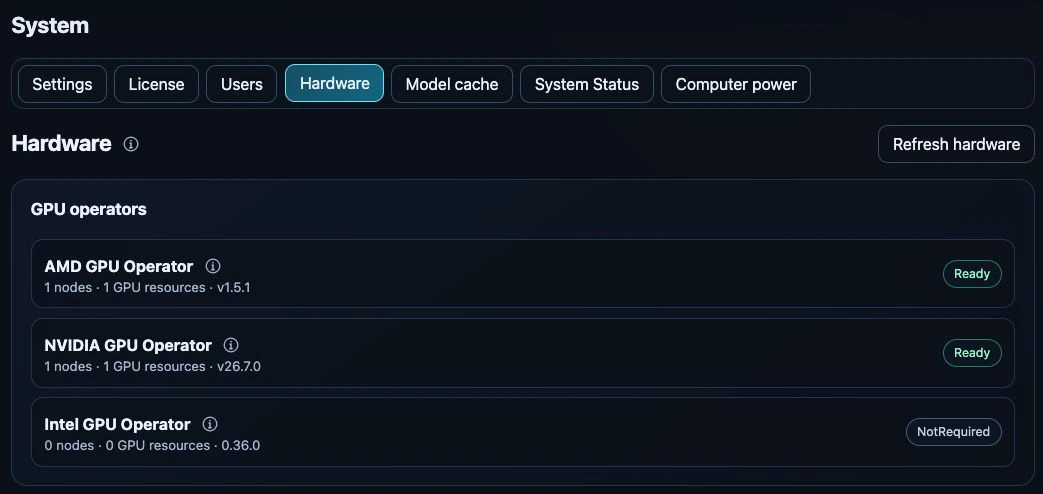
Operator summary on the test appliance, captured 24 September 2026. NotRequired means no matching hardware was detected; the displayed versions are a dated example, not the current compatibility contract.
Detection, host readiness, Kubernetes registration and engine validation are separate checks. A detected PCI device or green operator alone does not prove that the inference runtime can use it. Read the compatibility matrix.
Prepare supported hardware
For a host with a reviewed preparation plan, inspect the running/planned kernel and driver plan. Review the operation and confirm the exact computer name when requested. Package installation or restart can interrupt all workloads on that computer, including GPUs from another vendor.
Experimental profiles are explicit exceptions, not automatic certification of a mixed system. Unreviewed combinations can require experiment-mode consent, and unsafe/stale/incomplete host evidence still blocks operations. See host preparation and recovery.
Configure a GPU
Open its vendor configuration for sharing and, on supported AMD unified-memory hardware, memory configuration. Change only one configuration at a time and wait for the host/operator status to settle.
Optional validation
Below the GPU accordions, select all GPUs on the node or one GPU and invoke the offered Ollama/vLLM verification action. These tests consume resources and may wait for free devices. Validation is optional; an unverified label is not itself a reason to disable an otherwise eligible GPU. A passed tiny-model test is not a sizing guarantee for a production model.