Model startup and lifecycle
Read runtime logs in the dashboard
- Open Models and choose Logs on the affected model card.
- Expand its Pod and inspect the relevant container's Current run. Previous output is also shown when available after a container restart.
- Read the first actionable error, not only the final readiness timeout. Use Refresh for another bounded snapshot; this is not a complete log archive.
- Review any copied output before sharing it. Logs can contain user input, credentials or internal addresses.
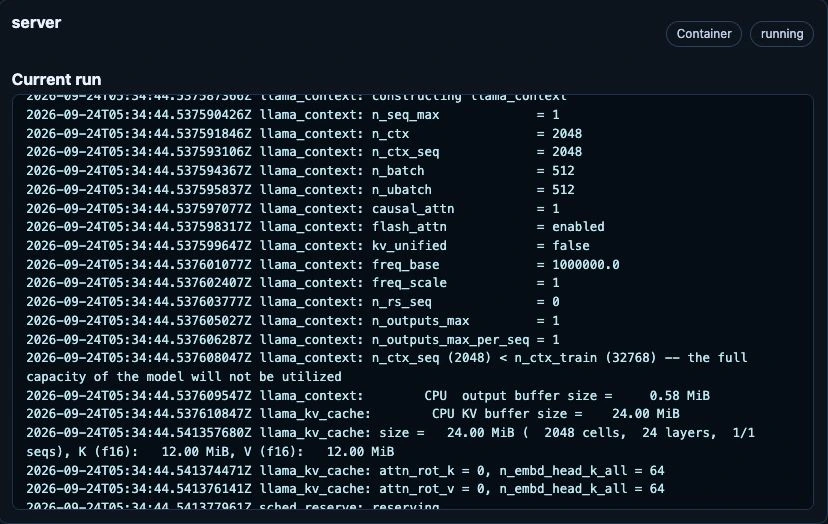
Live excerpt from the owner-authorized CPU test model, 24 September 2026. This healthy initialization example shows where to inspect output, not an error or a performance benchmark. Pod/host details, internal addresses and input content are outside the crop.
Stop and resume models
In Models → Installed Models, operators and administrators can use Stop for Ollama, vLLM (including Realtime), or FreeToken. This interrupts local inference and removes the model's runtime without deleting its saved model definition or settings. Wait for stopping to finish, then use Start to deploy the same configuration again. GPU slots and CPU/GPU memory become available as the runtime Pods and allocations are released, not necessarily as soon as the button is pressed. Starting again can wait for capacity or download/initialization work; inspect the status and Logs if needed.
FreeToken's Pod-local temporary model cache is deleted with its Pod, so Start may download those weights again. Stopping does not clear shared persistent model caches, credentials, or container images. External-provider Start/Stop controls only the Magic Stick route, never the remote provider process. Use Remove only when the saved activation itself should be deleted. See model lifecycle.
Model Catalog
For a model blocked by Insufficient cpu, compare Pod requests with the
node's allocatable CPU, not just kubectl top usage. The model status now
includes PodScheduled=False/Unschedulable details. Automatic CPU requests
are independent of RAM/VRAM; the defaults and override fields are documented
in CPU scheduling policy.
After upgrading, confirm status.cpuResources, the final KubeAI count-one
resource profile and the Pod's actual requests/limits. Existing Pods are
replaced as the policy changes. Keep the host/Kubernetes reserve; do not
increase allocatable CPU to disguise excessive model requests. Check CPU use,
throttling and inference latency under real load before reducing requests
further or increasing a CPU-inference limit.
kubectl -n ai get configmap ai-model-catalog \
  -o jsonpath='{.data.AI_APPLIANCE_MODEL_CATALOG_READY}{"\n"}{.data.AI_APPLIANCE_MODEL_CATALOG_HASH}{"\n"}'

kubectl -n ai logs deploy/ai-model-catalog-controller
For schema details and model troubleshooting, see model-catalog.md.
For a multimodal vLLM model that fails during vision-encoder profiling, inspect the model Pod logs for the selected ViT backend and SDPA kernel warnings. A large temporary attention allocation is distinct from the model's KV cache or CPU scheduling request. On AMD, Edit → Advanced → Deployment → Vision attention backend selects the alternatives documented in vision attention deployment. After an intentional change, verify the generated KubeAI Model args/env and the new Pod's logs, then test both text and representative image requests. Keep context and memory budgets fixed when comparing backends. Check actual peak memory and output correctness; Ready alone is insufficient. Explicit Automatic removes the managed manual overrides; it may restore the same SDPA fallback that caused the original failure. Do not automatically switch all existing models or treat an untested backend as a capacity guarantee.
Operations
Inspect generated catalog status:
kubectl -n ai get configmap ai-model-catalog \
  -o jsonpath='{.data.AI_APPLIANCE_MODEL_CATALOG_READY}{"\n"}{.data.AI_APPLIANCE_MODEL_CATALOG_HASH}{"\n"}'
View available chat models:
kubectl -n ai get configmap ai-model-catalog \
  -o jsonpath='{.data.chat-models\.json}' | jq .
Check controller logs:
kubectl -n ai logs deploy/ai-model-catalog-controller
Common failure modes:
| Symptom | Check |
|---|---|
AI_APPLIANCE_MODEL_CATALOG_READY=false |
Controller has not completed a successful reconcile; check controller logs and LiteLLM reachability. |
| External model missing | Confirm ai-external-models.data["models.json"] is valid JSON and the entry is not enabled: false. |
| Default model is empty or unexpected | Confirm the requested default id exists and has the expected chat or embedding type. |
| Consumer app still uses old model data | Confirm the pod has the consumer label or annotation, or restart the app after the catalog hash changes. |
| Secret-backed external model fails | Confirm the referenced Secret and key exist in namespace ai; the controller needs to read the Secret value to sync LiteLLM. |