
Create and open applications
Before you start
You need Operator or Administrator access to provision services. Application users receive only the instances allowed by their role and sharing policy. Have a ready model when the selected application needs inference.
Create an instance
- Open Services. Applications, AI Runtime and Platform describe different kinds of components, not separate installation products.
- Choose the application and create an instance. Fill only the fields offered by its catalog-backed form; required modules are reconciled by the platform.
- Review model selection, storage, access requirements and generated local/public URLs.
- Wait for the instance to be ready, then open its discovered URL.
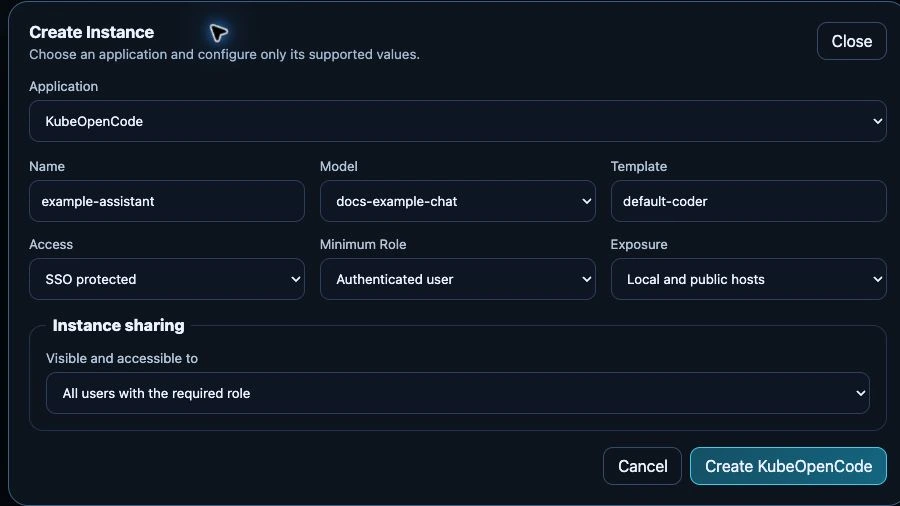
Unsubmitted test-appliance form, 24 September 2026. The selected model is the documentation test model; the neutral instance name is only a draft. No application or access-policy change was submitted for this capture.
Use Credentials only when the application exposes a credential panel and your role permits access. A URL being present does not bypass SSO or instance access rules. See sharing to grant selected users or groups access.
OpenClaw, KubeOpenCode and AnythingLLM
Choose a chat model when creating an OpenClaw or KubeOpenCode instance. Each instance keeps its selection when the shared catalog or global default changes. If that model becomes unavailable, select a replacement explicitly. OpenClaw's compaction budget follows the chosen model's context limit.
OpenCode instance links use <name>.oc.<domain>, for example
example.oc.magicstick.local. Open the current link from Services after an
address update; your agent and workspace are not recreated. The official
OpenCode image automatically connects to that same HTTPS address. The central
KubeOpenCode console has its own, separate module link.
AnythingLLM is enabled directly from its service card. Before enabling it, open Services → AnythingLLM → Configure and choose Chat model and Embedding model. Each list offers the available models for that task. You can register several models and choose one initial default for each purpose. Leave a list on Use catalog default to follow the catalog's initial choice. A missing saved selection must be replaced or reset before enabling the service.
The choices initialize a fresh installation: Chat answers questions; Embedding prepares documents for search. Chat requires an available model; document indexing also needs an embedding model. After setup, change preferences in AnythingLLM itself. Its saved choices survive restarts and catalog updates and take precedence over these initial defaults. Keep an existing index's embedding model unless you plan to reindex the documents. Before upgrading an older installation, an administrator must complete the settings migration.
Hermes
Choose a ready chat model when creating a Hermes instance in Services. The current Hermes release requires at least 64,000 context tokens; use a model with that actual configured capacity. A smaller or unknown context appears as an instance status error. Its browser link opens the Hermes dashboard through the existing SSO access controls. Change the managed model in the instance settings; the operator owns that configuration, so editing Hermes' native configuration file is not a supported way to change it. Workspaces and sessions remain on the instance's persistent volume. See the configuration reference.
Paperclip
Create a Paperclip instance in Services, choose the default chat model and review storage and the concurrent-agent limit. Open its browser link once it is ready, then create companies, tasks and agents in Paperclip. OpenCode agents use isolated Kubernetes sandboxes and keep their own explicit model choices. The instance upgrades its Kubernetes plugin before its browser link becomes ready; the first installation and a plugin upgrade require npm access. Ordinary restarts reuse the installed plugin.
The current OpenCode sandbox image supports AMD64 only. Gateway selections in the instance form are stored preferences; configuring gateway agents and their credentials in Paperclip remains manual. See the Paperclip execution guide for compatibility, workspace persistence and upgrade limits.
Pi Coding Agent
Pi is a coding agent for the terminal. Magic Stick provides its Pi 1.0.0 interface in your browser, with the same SSO and instance-sharing controls as other applications.
- In Services, enable Pi Coding Agent and wait for its required services to be ready. Deploy a chat model first if none is available.
- Choose New Instance, set a name and model, and review access and exposure. Configure lets you change the default 5 GiB storage allocation.
- Wait for Ready, then open the instance URL. The first start downloads the pinned Pi and browser-terminal releases, so GitHub access is required.
- Ask Pi to work on a project, or use its
!shell commands to clone a repository into the workspace./newstarts a new conversation;/resumeselects a saved one.
The workspace, Pi settings, provider sign-ins and sessions survive Pod restarts. Reopening the terminal continues the latest conversation. Each instance accepts one browser connection at a time; users with access share its files, sessions and runtime credentials. Give access to trusted users, and create separate instances for separate workspaces. Pi's tools can execute commands inside its container; they do not receive host mounts or a Kubernetes API credential.
If installation shows Degraded, inspect the instance's error before removing it. The bootstrap checks downloads and starts both pinned programs to verify compatibility; an unavailable selected model also blocks terminal startup. Correct the reported prerequisite or install the qualified software fix rather than deleting the workspace. An upgrade keeps the existing instance data.
Removing a Pi instance keeps its data volume. Recreating the same instance name reuses it; an administrator must explicitly remove the retained volume to erase it. See Pi configuration for runtime requirements and model behavior.
Stop or remove components safely
Review instance dependencies and persistent-data retention before removing a service. Disabling a shared runtime can affect several applications. Back up databases and documents before destructive changes; deleting an instance is not a backup mechanism.
Verify
Open the application as an intended user, make a small request and verify its chosen model. For a failure, inspect the instance status before changing generated Helm resources manually. See application troubleshooting and configuration reference.